Showing posts with label web resource. Show all posts

Wednesday, May 15, 2013

Hit the Mother Lode of Internet Resources


Executive Director Jeff Burkhart sent me the resource below to share with all tutors. It comes courtesy of ESL teacher Jodi Koller from Lakeshore Tech. Many of the resources are already on the Delicious.com links, but this list covers nearly all the topics that learners ask for help with.


Click here for a link ... It will take you Literacy Network's website, where you can download a MS Word document with the list of internet sites.The free online resources are for the following topics:

  • Reading
  • Listening
  • Grammar
  • Common Words
  • Spelling Practice Websites
  • Pronunciation Practice
  • Conversations
  • Online Dictionary
  • U.S Citizenship/Civics
  • General ELL Sites
  • Typing
  • Practice Geography
  • Math
  • News and Weather
  • Everyday Life 
With just a couple of clicks, it can be all yours. Thank you, Jodi Keller!

Wednesday, April 28, 2010

Free Learning Website

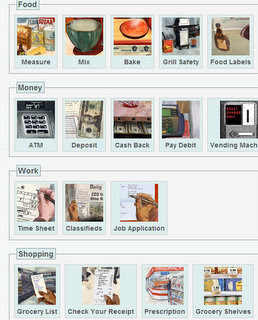
Literacy Network volunteer Kelley Burd-Huss discovered a great resource recently and brought it to my attention. The website www.gcflearnfree.org has interactive tutorials for everything from numbers and measurement to food shopping, job searching and computer use. It provides graphics and spoken instructions that are slow and easy to understand for a non-native speaker of English. Being a baker myself I took one tutorial which led me step by step to measuring and mixing the ingredients for a cake. You can hear and read the instructions, then click-and-drag out, for instance, a box of salt and pour out 1/8 teaspoon. At the bottom of the picture below see the text of what the narrator is saying. You have to try it for yourself to appreciate how much fun it is. It has great potential for tutors who meet with their learners at a library or other site with internet access.

The microwave instructions are fun, because they teach how to set the cooking time and power on a microwave's key pad then drag a cup of coffee or a frozen pizza slice into the oven. When you succeed your food comes out steaming. It helped that a clear, natural sounding voice offered instructions in the background. When I made an error the voice sounded like my own internal thoughts saying, "Oh, yeah. I need to push the time button and then enter numbers."

The same drag-and-drop skills turn out to be helpful in the tutorial on how to fill out a job application. The learner simply drags his address or job history onto the right part of the application. A voice (again sounding like someone's internal monologue) lets you know when you get things right and guides you to the right answer when you get it wrong. It even makes comments like, "That was a nice place to work. It was a shame the company went belly up." In addition to applying for work you can learn how to prepare for and behave in an interview.

For the learner who wants to begin using computer applications like MS Word, Excel or Outlook, more clear pictures, text and voice instructions walk you right through. Basic arithmetic and math skills, money, safety, health and even telling time are all topics that make excellent lessons for tutors in both basic literacy and ESL. The service is free, but you will need to create a user name and password in order to use it.

The same drag and drop skills turn out to be helpful in the tutorial on how to fill out a job application. The learner simply drags his address or job history onto the right part of the application. A voice (again sounding like someone's internal monologue) lets you know when you get things right and guides you to the right answer when you get it wrong. It even makes comments like, "That was a nice place to work. It was a shame the company went belly up." In addition to applying for work you can learn how to prepare for and behave in an interview.

For the learner who wants to begin using computer applications like MS Word, Excel or Outlook, more pictures, text and voice instructions walk you right through. Basic arithmetic and math skills, money, safety, health and even telling time are all topics that make excellent lessons for tutors in both basic literacy and ESL. The service is free, but you will need to create a user name and password to use it.

Monday, November 23, 2009

Hello, ELLLO


English Listening Lesson Library, or ELLO.org, is an extraordinary website for teachers and learners who want a chance to hear natural but easy-to-understand conversation. Four tabs across the top take you to four different areas.
The Views tab has literally hundreds of stories of real people sharing personal experiences on hundreds of topics. Each story has a transcript you can follow along with. The home page holds the most recent stories, but you can search for other topics you don't see at first. I searched for some very ordinary terms, e.g. childcare, safety, movie, dating. Each of those searches turned up more stories than I had time to listen to.
Speakers take care to talk at a leisurely pace and use clear diction. When a speaker uses an idiomatic expression a link pops up in the transcript. Click on that and an audio player pops up to give a concise definition. Here is a screen-grab of that audio player:

It's easy to pause the story for a quick explanation of the new vocabulary term.

Mixer, according to the site, is " a listening activity that features six speakers. Each speaker answers the same question. Students can listen to the answers for fun or test their listening comprehension by answering the questions."

Game lets you test your listening comprehension by clicking on one of four pictures. I, a native speaker, made a few mistakes on that one. The fact that some of the people have Australian, French or other foreign accents adds a measure of difficulty to the challenge.

STeP resembles a Voice of America program in Special English. It features someone talking with careful English teacher diction about a topic. Listeners can participate in a timed comprehension quiz.

News features a cartoon newsreader who reads imaginary news stories. Her lips move and illustrations change behind her while she reads each piece. Interactive quizzes test what the listener has retained.

In most cases you can download the stories to your computer or iPod as MP3 files . I downloaded one three-minute file in less than half a minute. Tutors or teachers should be able to download these audio files and give them to their students on CDs as homework, or simply as something to listen to while they drive to work or do the dishes. I often assert that homework is anything that gets your learner exposure to English between lessons. For those who don't have ready access to a computer with broadband, the public libraries are a great option. Elllo is here, its fun, it's rich with stories. I hope you get a chance to look at it.

Tuesday, November 4, 2008

Multi Sensory Resource


The technical tip part of this week's message was given to me by Francisca Welch, a new tutor to us and an experienced Montessori teacher. She showed me where to find templates for letters that tutors can cut out of sandpaper to make multi-sensory teaching materials. Learners can use these letters to practice tracing them with their fingertips in order to get the sense of touch involved. Imagine yourself and your learner making the sounds of the letters at the same time as you touch their textured surfaces. The connection of touch and sound input at the same time helps learners get a better feel for the relationship of the letter to its sounds. She downloads these for free at the website montesorrimaterials.org. You will find many useful thing there that are not strictly phonics related, too. There is a list of US Presidents that could be useful for ESL learners studying civics. Math materials are there too. And very interestingly, there is a list of homophones, words like pear and pair that many tutors have asked me about. Enjoy! Thanks for being a tutor.